


ACSI2STM Mini Hard Disk for Atari ST series
ACSI2STM Mini Hard Disk for Atari ST series
Couldn't load pickup availability
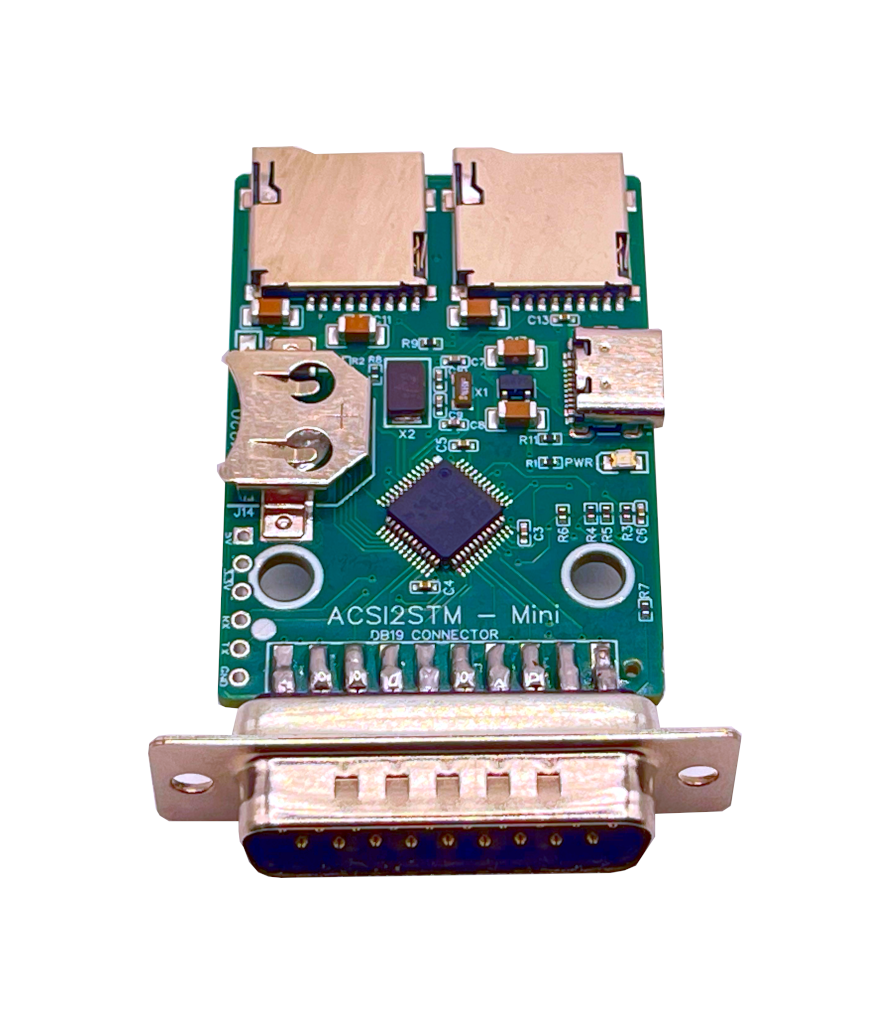
microSD storage for your Atari ST in the smallest possible footprint
The ACSI2STM Mini turns a microSD card into a fast, silent hard disk for any Atari with an ACSI port, on a 65 x 35 mm board with a built-in DB-19 connector. It is a derivative of the ACSI2STM open-source project by retro16 and runs the same firmware as the ACSI2STM Compact, with the same GemDrive and ACSI operating modes. Order the board on its own or with a desk-ready 3D-printed enclosure.
Ships from Spain. For the Atari ST, STE, Mega ST and Mega STE.
Key features
- 65 x 35 mm footprint: one of the smallest ACSI hard-disk emulators available. Sits flush against the Atari's ACSI port without dominating the desk or trailing cables across the setup.
- Direct DB-19 connection: a built-in D-SUB DB-19 connector mates the board straight into the Atari ACSI port. No loose ribbon cables, no adapters, no flaky contacts on an aging port.
- 4-layer PCB, premium microSD slots: the same upgraded 4-layer PCB as the Compact for clean signal integrity on electrically noisy machines, plus two high-quality push-eject microSD slots from the SidecarTridge Multi-device.
- GemDrive mode, no drivers needed: format the microSD card with FAT16, FAT32 or ExFAT, drop in files from any modern PC, and the Atari sees them straight away. No Atari-side drivers, no extra partitioning.
- ACSI mode for legacy software: emulates traditional ACSI hard drives with multiple partitions using Atari-compatible drivers, for full compatibility with classic software that expects a real hard disk.
- UltraSatan-compatible RTC: an on-board real-time clock keeps the date right between cold boots when fed by a CR1220 or CR1225 lithium battery (not included).
- Firmware upgrade from the Atari: future fixes and features land directly through the Atari itself via the firmware update utility. No JTAG, no programmer, no host PC required.
- Refined oscillator circuit: the crystal oscillator circuit was recalibrated with updated capacitor values, fixing rare boot and startup issues present in the original design. Full technical detail in the upstream issue thread.
- Optional desk-ready enclosure: order the board on its own or paired with a custom 3D-printed enclosure designed specifically for the Mini, for a clean look without firing up a 3D printer.
Pick a kit
Choose the variant that fits your setup:
- ACSI2STM Mini board only: board fully assembled and tested with the latest stable firmware preloaded, DB-19 connector factory-soldered. Bring your own enclosure or 3D-print one with the community STL files.
- ACSI2STM Mini board + enclosure: everything in the board-only kit, plus a custom 3D-printed enclosure designed specifically for the Mini for a desk-ready setup.
Both kits ship with the latest stable firmware preloaded. You will still need a USB-C cable, a USB power source and a microSD card. The CR1220 or CR1225 RTC battery is optional.
Installation overview
- Prepare a microSD card with FAT16, FAT32 or ExFAT for GemDrive mode, or with the appropriate Atari hard-disk driver image for ACSI mode.
- Insert the microSD card into one of the two slots on the board.
- Connect the Mini to the Atari ACSI port through the built-in DB-19 connector.
- Power the board with a USB-C cable plugged into a USB-C charger, a USB power bank, a host computer or a SidecarTridge Multi-device. The ACSI port does not deliver enough current to power the board.
- Power on the Atari. The microSD card shows up as a hard drive ready for use.
Full documentation lives at docs.sidecartridge.com/acsi2stm-atari-st.
Compatibility
| Atari model | Status |
|---|---|
| Atari 520 STF / STFM | Supported |
| Atari 1040 STF / STFM | Supported |
| Atari STE / 1040 STE | Supported (Bad-DMA workaround via PIO mode if needed) |
| Atari Mega ST | Supported (external only) |
| Atari Mega STE | Supported (external ACSI port only) |
| Atari TT | Not supported |
| Atari Falcon | Not supported |
The Mini is an external device with a fixed DB-19 connector. It does not install inside a Mega ST or Mega STE. If you need an internal install with chaining or external LED support, pick the ACSI2STM Compact. The PIO workaround for the Atari STE Bad-DMA issue is part of the firmware; the trade-off is slower transfers, full detail in the documentation.
Mini or Compact?
| Feature | ACSI2STM Mini | ACSI2STM Compact |
|---|---|---|
| Audience | Users prioritising size and simplicity | Users needing expansion and chaining |
| Dimensions | 65 mm x 35 mm | 70 mm x 60 mm |
| PCB layers | 4-layer | 4-layer |
| ACSI connector | Integrated DB-19 | Integrated DB-19 |
| microSD slots | 2 | 3 |
| Real-time clock | Yes (CR1220 or CR1225) | Yes (CR2032) |
| Firmware upgrade | From the Atari / serial | From the Atari / serial |
| Operating modes | GemDrive and ACSI | GemDrive and ACSI |
| Power supply | USB-C cable (not included) | USB-C cable (not included) |
| Enclosure option | Yes (3D-printed) | No (community STL files) |
| IDC20 chaining | No | Yes |
| External LED output | No | Yes |
| Internal Mega install | No | Yes (with riser kit) |
Specs
- MCU: STM32 family (ACSI2STM reference design).
- Board size: 65 mm x 35 mm.
- Interface to Atari: D-SUB DB-19 connector, ACSI bus.
- Storage: two push-eject microSD slots, FAT16 / FAT32 / ExFAT (GemDrive) or Atari-formatted images (ACSI).
- Operating modes: GemDrive and ACSI.
- RTC: UltraSatan-compatible, CR1220 or CR1225 lithium battery (not included).
- Power: USB-C, 5V. No power is drawn from the ACSI port.
- Firmware: open-source, OTA upgrade from the Atari itself.
- Enclosure: optional custom 3D-printed enclosure, sold separately or as part of the board + enclosure kit.
- Upstream project: retro16/acsi2stm, GNU License.
Good to know
- External device only. It does not install inside a Mega ST or Mega STE; for an internal install use the ACSI2STM Compact with its riser kit.
- You provide a USB-C cable, a USB power source and a microSD card. The RTC battery is optional.
- This is homebrew for hobbyists comfortable copying files onto a microSD card and reading documentation. It runs out of the box, but it is not a sealed appliance.
- The Mini runs upstream firmware. Bug reports and feature requests go on the retro16/acsi2stm GitHub repository. SidecarTridge handles hardware-side support for the boards it sells.
Share


- 5 stars: 3 (75%)
- 4 stars: 1 (25%)
- 3 stars: 0 (0%)
- 2 stars: 0 (0%)
- 1 star: 0 (0%)
Works great and i could print the housing by myself!
It is great that you still care about older computers and make devices to
interact with internet and other systems.
Great bit of kit. Thought it was like the arduino I had for my Spectrum. But You can copy to it from your floppy.drive
It is like a hard drive. Excellent price, excellent service.
World great. Easy to setup. Always the best equip..