


SidecarTridge Souffle Keyboard Emulator for Atari Mega ST/STE
SidecarTridge Souffle Keyboard Emulator for Atari Mega ST/STE
Couldn't load pickup availability
External IKBD keyboard emulator for Atari Mega ST and Mega STE
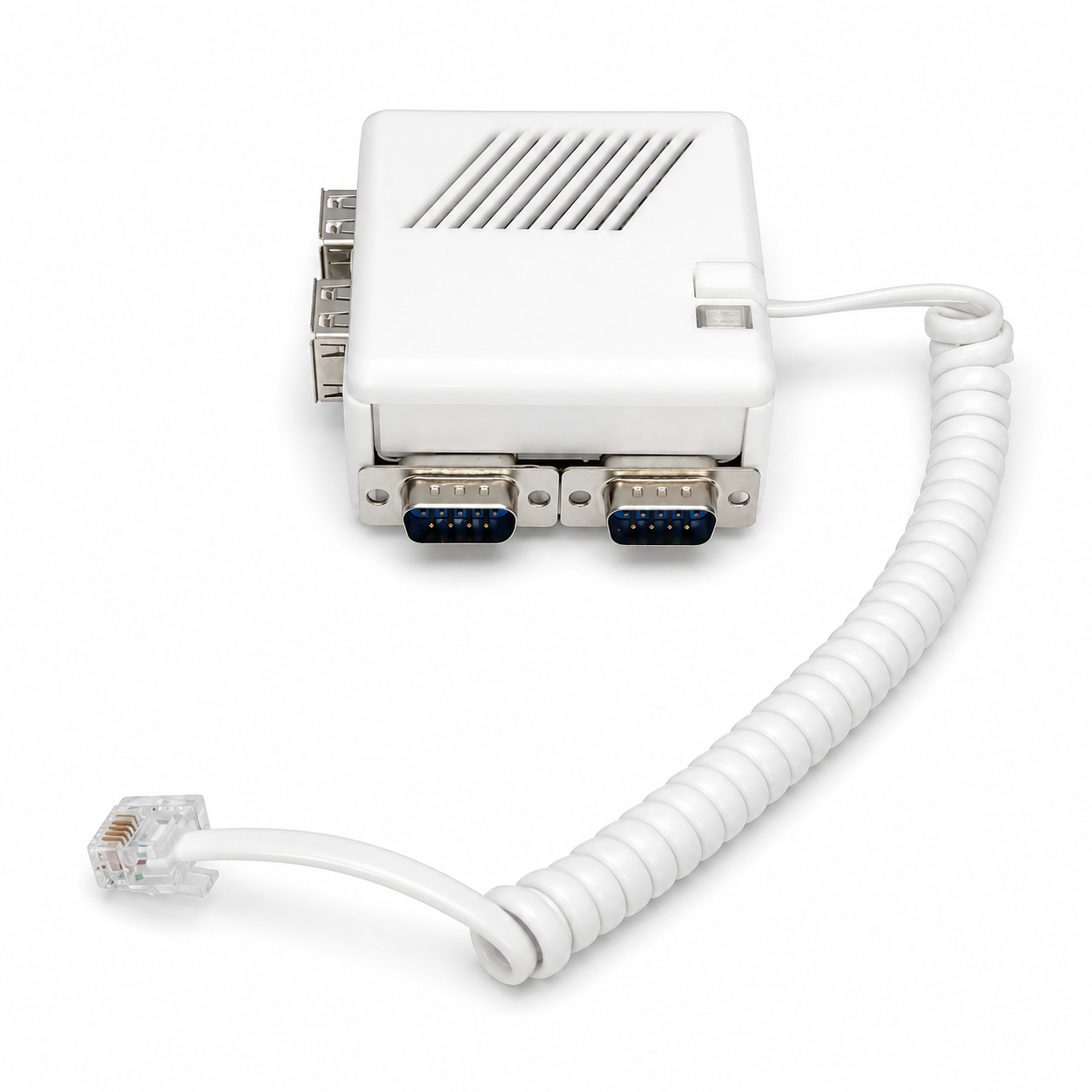
The SidecarTridge Souffle is the external member of the SidecarTridge Keyboard Emulator family. It connects to the Mega ST and Mega STE keyboard port through a 1 m coiled RJ11 6P4C cable, taking the place of the original keyboard and behaving like the IKBD the computer expects. A built-in USB hub brings modern keyboards, mice and gamepads to the machine, while two native Atari outputs keep your original mouse and joysticks working. It is a strong fit for any Mega whose original keyboard is missing or no longer works.
Ships from Spain. For the Atari Mega ST and Mega STE keyboard connector.
Key features
- External plug-in replacement: connects to the Mega ST and Mega STE keyboard port through a 1 m coiled RJ11 6P4C cable, in place of the original keyboard. No opening the machine, no motherboard modification, no soldering.
- Built-in 4-port USB hub: four USB-A ports on board for modern keyboards, mice and gamepads. Plug in the input devices you already own and use them on the Atari with IKBD-native behaviour.
- Native Atari mouse and joystick outputs: two DB9 outputs keep your original Atari mouse and joysticks fully working, side by side with the modern USB devices. Nothing about the classic input path is lost.
- Modern Bluetooth input: Bluetooth Classic and BLE support for keyboards, mice and gamepads. Pair wireless devices straight to the Mega and keep the machine behaviourally honest, built around the IKBD model the computer expects.
- Wi-Fi web configuration: set pairing, keyboard layout, mouse speed and auto-fire from any modern browser. Souffle exposes its own Wi-Fi access point on first setup and joins your network afterwards.
- Field-updatable firmware: firmware updates land through the on-board micro-USB connector. No JTAG, no programmer and no Atari-side rituals.
What you get
- Souffle dongle fully assembled and tested, latest stable firmware preloaded.
- 1 m coiled RJ11 6P4C cable for the Mega ST and Mega STE keyboard port.
The 4-port USB hub is built into the board. You provide your USB or Bluetooth input devices plus a micro-USB cable for setup and firmware updates. A modern phone or laptop is enough to run the web configuration interface.
Installation overview
- Power the Souffle over micro-USB first and open the Wi-Fi web setup from any modern browser to choose its operating mode (USB or Bluetooth) and pair your input devices.
- Power off the Atari and unplug the original keyboard from the Mega ST or Mega STE keyboard connector.
- Connect the Souffle coiled cable to the keyboard port using its RJ11 6P4C plug.
- Plug in your input devices: USB devices into the built-in hub, and your original Atari mouse or joysticks into the DB9 outputs if you want to keep using them.
- Power on the Atari and start using it.
Full step-by-step in the Souffle quickstart. Reference for Bluetooth pairing, keyboard layouts, mouse speed and firmware updates is in the keyboard emulator documentation.
Compatibility
| Atari model | Status |
|---|---|
| Atari Mega ST | Supported |
| Atari Mega STE | Supported |
| Atari 520 / 1040 ST / STF / STFM / STE (internal 7-pin keyboard) | Use the internal Croissant board instead |
| Atari TT | Works in theory, use at your own risk |
| Atari Falcon | Not supported (different keyboard architecture) |
Souffle is the external option for the Mega keyboard port. For machines with the internal 7-pin keyboard connector, the internal Croissant board is the right fit.
Specs
- Connector to Atari: 1 m coiled cable, RJ11 6P4C, in place of the original Mega keyboard.
- USB input: built-in 4-port USB-A hub for keyboards, mice and gamepads.
- Native Atari outputs: two DB9 outputs for the original Atari mouse and joysticks.
- Wireless: Bluetooth Classic and BLE, Wi-Fi 2.4 GHz.
- Input behaviour: full IKBD emulation, multiple keyboard layouts, adjustable mouse speed, programmable auto-fire.
- Configuration: browser-based, served over Wi-Fi (access point and station modes).
- Firmware update: on-board micro-USB.
- Microcontroller: RP2350.
- Board revision: SOUFFLE-IKBD REV1.2.0.
Good to know
- Fully external. No opening the machine, no shield removal and no motherboard modification.
- A clean way to bring a Mega back to life when its original keyboard is missing or no longer works.
- This is a homebrew product for hobbyists who like experimenting. It is not a sealed appliance with a single-vendor warranty stack.
New to the device? Follow the quickstart guide.
Share


- 5 stars: 1 (100%)
- 4 stars: 0 (0%)
- 3 stars: 0 (0%)
- 2 stars: 0 (0%)
- 1 star: 0 (0%)
Everything as expected